

This is an experimental bonus feature, and at this stage I won’t go into too much detail, but this is what it looks like:
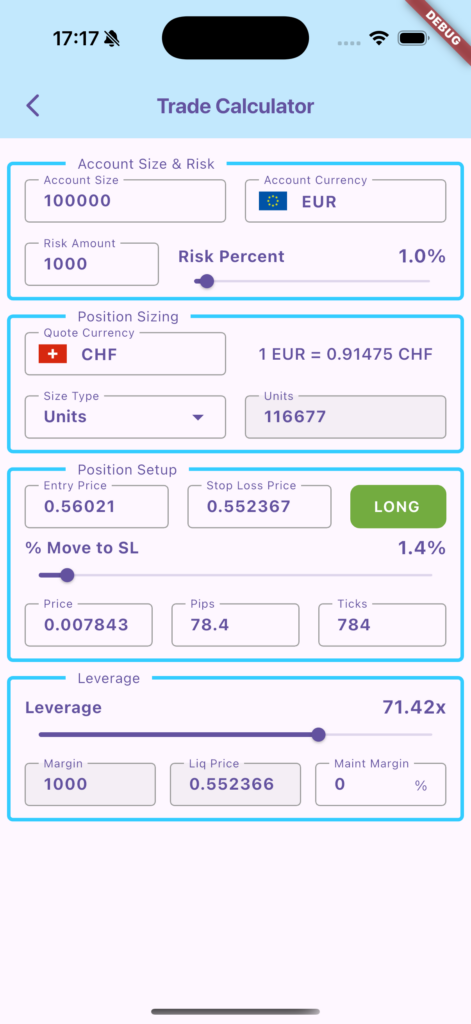
Under Account Size & Risk, you can specify your account size, your account currency, and what percentage of your account you want to risk per trade.
The Position Sizing section underneath is for FOREX trading. By specifying the quote currency of the pair you are trading, it allows the app to correctly calculate your position size for the risk amount you entered above.
In the Position Setup you specify your entry price and stop loss price. The app will automatically determine from these 2 values if you are entering a long or short position, but if you press the LONG button, it will mirror the stop loss distance to the other side. With the slider, you can specify the distance of your stop loss from the entry price, which some people prefer rather than give actual numbers. The Price, Pips and Ticks fields show you the distance in absolute numbers, pips, or ticks (“pipettes”) based on this.
The Leverage section is interesting for example if you want to trade crypto futures. It shows you, based on the values you entered in the previous section, your maximum leverage you could use without getting liquidated by the exchange/broker. Optionally, you can specify a maintenance margin percentage to be taken into account, which most brokers will add and which, if not taken into account, could mean that you get unexpectedly liquidated.