

Here you can access a number of different features of the app.
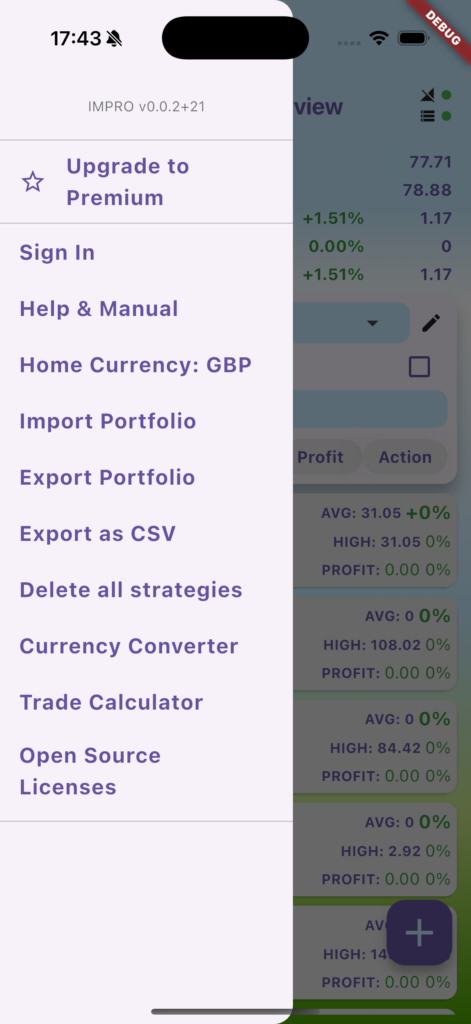
From top to bottom:
IMPRO2 version number, and, if logged in, email address and service (Google or Apple) you are logged in with.
Upgrade to Premium: See the benefits here
Sign In/Sign Out: The Premium version allows you to sign in with your Google or Apple login, and automatically synchronises your portfolio with the cloud. If you log in on a different device, or re-install IMPRO2 in the future, your portfolio associated with the login will automatically be restored
Help and Manual: This links to this manual
Reference Currency: Set it to your home currency, and your investment statistics will automatically be converted into that currency. IMPRO2 automatically looks up past currency conversion rates, so for example, if you bought RUNE/USDT on 1/5/23, IMPRO2 will convert the amount of USDT spent into the equivalent value in your home currency on that day.
Import Portfolio: If you have previously backed up your portfolio with ‘Export Portfolio’, you can re-import this here
Export Portfolio: You can save a backup of the current state of your portfolio to a place of your choice
Export as CSV: This is useful if you want to import your data into Excel/Google Sheets to do your own calculations
Delete All Strategies: Be very careful with this option (although it does ask you to confirm)! If you delete your current portfolio, there is not way of bringing it back. If you do this whilst signed in and having cloud backup/sync enabled, it will delete it from the cloud too.
Currency Converter: A simple converter between multiple currencies – forex, crypto, stocks
Trade Calculator: An advanced calculator that can show you position size, but also maximum leverage (useful for crypto futures trading) based on your entry and stop loss
Open source licences: A list of all open source libraries used by the app – this is a requirement for most software libraries.